Math Kids: Math Games For Kids
- 4.5
- Rating
- 50.00M
- Installs
- Free
- Price
 Analysis by App-foxy
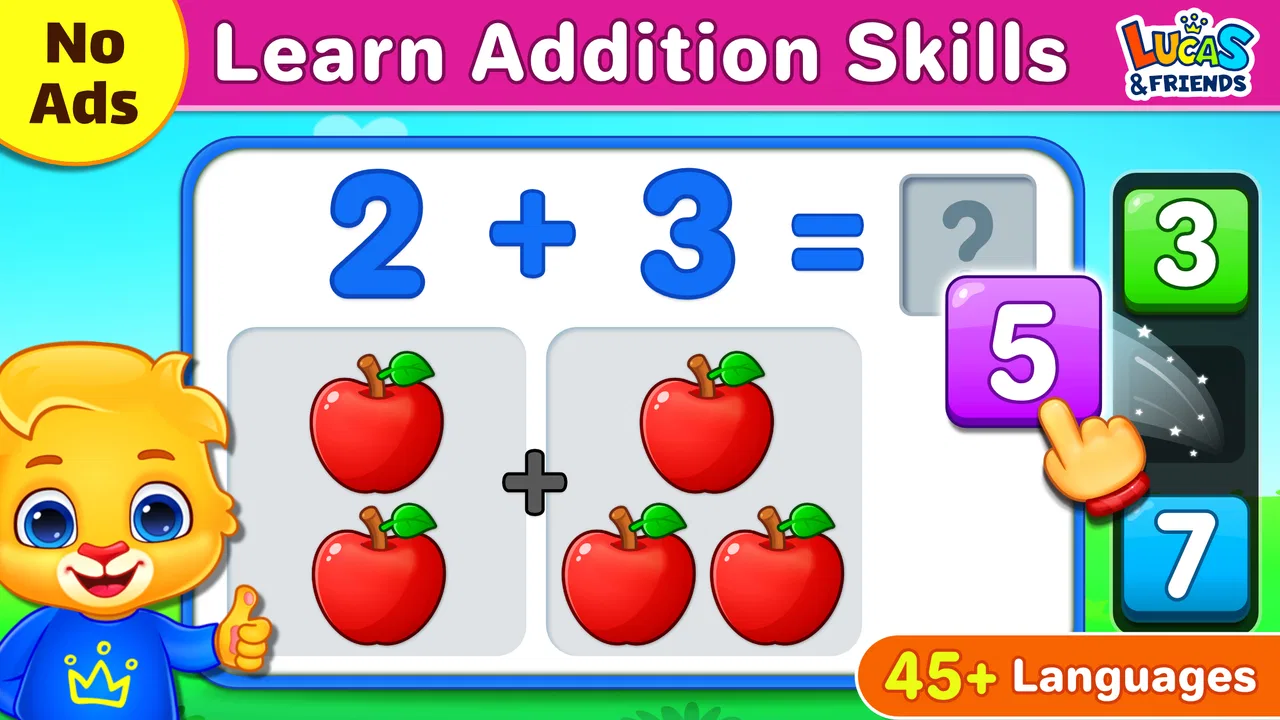
When I tested Math Kids: Math Games For Kids, I found a cheerful way to turn a short spare moment into basic number practice. It is an educational game for preschoolers, built around early skills such as counting, addition, and subtraction. I can easily imagine it being used on a shared household phone or tablet while an adult is nearby, especially when the goal is to offer something more useful than a random video without turning practice into a formal lesson.
The important thing is to approach it as a simple practice tool rather than a complete mathematics course. Its appeal comes from keeping the activities approachable for young children, while its limits become clearer if a child needs a carefully structured curriculum, detailed progress reports, or increasingly difficult work. In my experience, that makes it best suited to brief, repeatable sessions rather than long periods of independent study.
How it fits into everyday family use
A realistic use case is a shared device in the kitchen or living room. A preschooler might play for a few minutes while a parent finishes preparing a meal, or an older sibling might use the same tablet later for another activity. Because the game focuses on familiar early-number ideas, an adult can join in without needing to prepare worksheets or explain a complicated interface first.
You May Also Like

 Pandora - Music & Podcasts
Pandora’s Music Is Easy to Start, but Harder to Recover
Pandora’s strength is its low-effort path from a seed to a station. Its weak spot is how much confidence it asks you to place in connection, setup, and quiet recovery.

 8 Ball Pool
 Is Built on Rivalries, Rematches, and Routine
A close look at the rivalries, rematches, shared routines, and unanswered safety questions that turn a quick pool match into a persistent mobile community.

 Samsung Music
’s Quiet Strength Is Playing What You Already Own
Its reach comes less from spectacle than from dependable access to a personal library. That simplicity is both the app’s strongest retention engine and its ceiling.

 AccuWeather: Weather Radar
AccuWeather Review: A Quick, Clear Forecast for Everyday Decisions
For everyday plans, the best forecast is the one you can understand quickly. AccuWeather makes rain timing, radar, and local conditions easy to act on, with a few trade-offs.

 Hill Climb Racing
Why Hill Climb Racing Still Turns Crashes Into One More Run
A tiny car, a bumpy hill and one more upgrade: Hill Climb Racing keeps resurfacing because its simple chaos makes every near-miss feel personal.

 AliExpress - Shopping App
AliExpress Makes Global Shopping Feel Personal, but Shoppers Bear the Risk
AliExpress turns a global marketplace into a pocket-sized discovery engine. Its reach is useful, its shopping loop compelling, and its trade-offs easy to miss.
More From Our News Desk
View All News


I like this kind of arrangement because the game can act as a conversation starter. If a child is counting objects on screen, I can ask them to count similar items on the table. If an addition question causes hesitation, I can use toys or snacks to show the same idea physically. That small bridge between the screen and real life is more valuable than leaving the child to tap through answers without discussion.
Shared-device use also calls for sensible boundaries. I would decide in advance when the game is available and where the device is kept afterward. The application itself should not become the automatic solution for boredom, meals, or every quiet moment. Used as one option among drawing, reading, building, and outdoor play, it feels balanced. Used as the only learning activity, it becomes much less convincing.
One practical advantage is that a child can return to familiar number activities without an adult having to set up a new exercise each time. That makes it convenient for short practice windows. The trade-off is that convenience can encourage repetition without reflection, so I would occasionally sit beside the child and ask why an answer is correct instead of focusing only on speed.
What the first session feels like
The concept is easy to understand: a young learner encounters basic math tasks through game-like interaction. That matters for preschoolers, because an overly academic presentation can make a child lose interest before the practice begins. The friendly presentation gives the subject a lighter entry point, particularly for children who are still becoming comfortable with numbers.
I would begin with a short session and watch how the child responds to the instructions, the pace, and the visual layout. Some children will immediately understand what to do; others may need an adult to read or explain a prompt. That is not a failure of the game. It is a reminder that preschool learning is still highly dependent on language, attention, and confidence.
For a shared tablet, I would also let each child use the game in their own turn rather than treating one session as a competition. A younger child may need more time to count, while an older preschooler may be ready to answer more quickly. Comparing them can create unnecessary pressure and distract from the actual learning goal.
Setting boundaries before handing over the device
Math Kids is free, which makes it easy to try without adding a purchase decision to the first session. The developer is RV AppStudios, and the game is listed for Everyone, an age context that fits its preschool-oriented subject matter. Even so, an Everyone label is not a substitute for supervision. A parent still needs to decide whether the presentation, language, and pace suit a particular child.
On Android, the listed minimum operating-system requirement is version 6.0. That makes the game relevant to families using an older compatible device, although the actual experience can still depend on the tablet’s screen, responsiveness, and general condition. Before giving a child the device, I would open the game myself, check how the controls feel, and make sure the child can reach the intended activities without wandering into unrelated parts of the phone.
I would also separate the child’s play boundary from the account owner’s boundary. A shared device may contain messages, photos, shopping apps, or work documents. The safest routine is to hand over only what the child needs, keep the device within sight when appropriate, and avoid assuming that an educational label automatically makes the entire device child-ready. Those are household habits rather than features of the game, but they make a major difference in practice.
Another useful boundary is time. Early learners often benefit more from a focused session followed by a real-world activity than from extended tapping. I might use the game before asking the child to count socks, sort blocks, or help set the table. This gives the digital exercise a purpose and helps reveal whether the child understands the idea beyond the screen.
Coordinating practice between adults and children
In a household where more than one adult helps with care, a simple shared routine prevents mixed messages. One person might treat the game as free play while another expects measurable progress. I would agree on a modest aim, such as practicing counting today and talking through addition another day, without turning every session into a test.
Because the game is aimed at foundational skills, adults can coordinate through observation rather than complicated records. Notice which tasks make the child pause, whether they count carefully, and whether they guess when the answer is not obvious. Then use that observation to choose the next offline activity. A child who struggles with a small addition problem may need objects to move around, not more screen questions.
This approach is especially helpful on a shared device because the game should not be treated as a private scoreboard between siblings. I would praise careful thinking and persistence instead of celebrating whoever finishes first. If one child is already comfortable with the basics, I would offer a different activity rather than forcing the younger child to match that pace.
The game can also support a useful handoff between home and preschool, but only in a limited way. An adult can mention that the child has been practicing counting or simple sums, yet I would not present the app as evidence of mastery. A correct tap may show recognition, guessing, or help from an adult. Real understanding becomes clearer when the child can explain the answer or use the same idea with physical objects.
Age fit, trust, and adult involvement
The preschool focus is the strongest reason to choose this game. It is appropriate for a child beginning to recognize quantities and simple operations, or for a learner who needs gentle repetition. It may also work as a refresher for a child who has become uncertain about early arithmetic. I would be more cautious with a child who already needs multi-step problems, written explanations, or a more advanced progression.
The Everyone content rating is reassuring as a general age signal, but I would still preview the experience. Children differ widely at the same age. One may enjoy bright game-like exercises, while another may find the prompts too quick or prefer physical manipulatives. The right question is not simply whether the app is labeled for children, but whether this particular child can use it comfortably and meaningfully.
Adult trust should come from involvement, not from assuming the app can replace guidance. I would stay close during the first few sessions, especially if the child cannot read independently. Once the routine is familiar, a child may be able to play for a short period with less help, but I would still check in. The most useful learning often happens when the adult asks, “How did you work that out?”
There is also a difference between confidence and correctness. A child may tap quickly and appear successful while relying on visual guessing. To test genuine understanding, I would occasionally pause the game and create a matching question with household objects. If the child can transfer the idea, the activity is doing more than keeping them occupied.
Where it stands beside other early-learning choices
Compared with paper worksheets, the game is easier to start and likely feels less like homework. A worksheet can be better when a child needs handwriting practice, visible work steps, or something an adult can review afterward. Math Kids is more convenient for a quick digital session, but it does not offer the same physical record of how a child reached an answer.
Compared with physical counting toys, it is less tactile. Blocks, buttons, cards, and household objects let a child touch and rearrange quantities, which is important for building a concrete understanding of number. The game is useful after that kind of activity, or as a change of pace, but I would not use it as a reason to remove hands-on learning from the routine.
Compared with a full educational platform, this title is more focused and less demanding to organize. That simplicity is a strength for a family that wants quick practice without creating another complicated account or study system. The downside is that families seeking detailed customization, a broad subject curriculum, or extensive reporting may find it too limited.
Compared with videos, interactive questions offer a more active role for the child. The learner has to respond rather than only watch. Still, interaction alone does not guarantee deep learning. A video can demonstrate a concept clearly, while a physical game can encourage discussion and movement. I see this app as one component in a varied routine, not as the universal best option.
Small techniques that make the game more useful
My first tip is to use a “screen, then object” sequence. After a short activity, place a few safe household items on the table and ask the child to recreate a counting or addition idea. This reveals whether the child understood the concept and turns an abstract tap into something visible. It also gives the adult a natural stopping point instead of waiting until the child becomes tired.
My second tip is to avoid correcting every mistake immediately. I would ask the child to count again, point to each object, or explain the choice. That pause can show whether the problem is number knowledge, attention, or confusion about the instruction. The distinction matters: more repetition may help with one issue, while slower reading or a spoken explanation may help with another.
My third tip is to use the game as a transition rather than a reward for everything. A brief session before a counting walk, a sorting task, or a story about numbers gives it a clear place in the day. If it is always offered after chores or good behavior, the child may focus on earning screen time rather than enjoying the learning activity itself.
A fourth useful trade-off concerns independence. Letting a child try alone can build confidence, but stepping in too quickly can hide what they actually know. I would wait through a reasonable pause, then offer one small prompt rather than the answer. On a shared device, this also keeps the experience fair: each child receives support without one person taking over the controls.
Who should choose it, and who should look elsewhere
I would recommend it to parents, grandparents, and caregivers who want a free introduction to early math on a compatible Android device. It suits preschoolers who enjoy short interactive exercises and children who benefit from repeating counting, addition, and subtraction in a relaxed setting. Its broad reach is reflected in an average rating of 4.5 from around 66 thousand ratings, while more than 50 million installs show that it has become a familiar choice for many families.
I would skip it as the main solution if the child needs specialized support, a teacher-led sequence, extensive progress tracking, or advanced arithmetic. I would also look elsewhere if the household wants a purely offline, hands-on approach with no screen involved. Even when an app is age-appropriate, some families may simply prefer books, manipulatives, or direct adult-led play.
The game is free, but “free” does not mean costless in a broader sense. The family still spends device time, adult attention, and energy establishing healthy boundaries. Those costs are reasonable when the child is engaged and learning, but they are not reasons to extend a session that has stopped being productive.
My household verdict
After looking at it as a shared-device tool rather than just a children’s game, I see Math Kids as a practical starting point for early number practice. Its strongest quality is accessibility: a child can encounter basic math in a lighter format, and an adult can connect the activity to counting and problem-solving away from the screen.
Its limitations are equally clear. It should not be mistaken for a complete preschool curriculum, a substitute for conversation, or proof that a child has mastered arithmetic. The experience works best when an adult sets a short boundary, observes the child’s thinking, and follows the digital activity with something tangible.
RV AppStudios has made a free educational game that is easy to place into a busy family routine, particularly for households sharing one compatible Android device. I would install it for occasional practice, preview it before handing it to a child, and keep other learning methods in rotation. The best result comes from using the game as a bridge to real-world counting, not as a replacement for it.
FAQs for Math Kids: Math Games For Kids
01What age group is Math Kids: Math Games For Kids suitable for?
Math Kids: Math Games For Kids is designed for children ages 3 to 8. The app aims to introduce young learners to basic math concepts through engaging and interactive games. It is an excellent tool for preschoolers and early elementary students to develop foundational skills in a fun and supportive environment.
02Does Math Kids: Math Games For Kids require an internet connection?
No, Math Kids: Math Games For Kids does not require an internet connection to play. This makes it ideal for use on-the-go, whether you're traveling or in a location with limited internet access. All games and activities are fully accessible offline, ensuring uninterrupted learning.
03Are there any in-app purchases or ads in Math Kids: Math Games For Kids?
Math Kids: Math Games For Kids is completely free to download and use. The app does not contain any in-app purchases, ensuring that children can enjoy the full experience without additional costs. Additionally, it is ad-free, providing a safe and distraction-free environment for learning.
04What types of math games are included in Math Kids: Math Games For Kids?
The app includes a variety of math games covering fundamental concepts such as counting, addition, subtraction, and number comparisons. Each game is designed to be engaging and educational, with colorful graphics and interactive elements that encourage children to practice and improve their math skills.
05Is Math Kids: Math Games For Kids suitable for classroom use?
Yes, Math Kids: Math Games For Kids is suitable for both home and classroom use. Teachers can incorporate the app into their lesson plans to complement traditional teaching methods. The app's user-friendly interface and educational content make it a valuable resource for educators seeking to enhance their math curriculum.
Pros
- Engaging and colorful interface.
- Wide range of math activities.
- Encourages critical thinking.
- Suitable for various ages.
- No in-app purchases required.
Cons
- Limited offline functionality.
- Repetitive sound effects.
- Ads may disrupt gameplay.
- Complexity increases slowly.
- Requires parental guidance for setup.

Math Kids: Math Games For Kids
Gallery